
Internal linking is an important part of SEO, but the way you do it can change your results. Some people still prefer manual linking, while others use tools like Rank Math Link Genius.
I have tried both methods on my own site. Manual linking gave me control, but it took a lot of time and I often missed opportunities.
After using Rank Math Link Genius, I noticed a big difference. It helped me find links faster and build a better structure.
In this article, I’ll compare manual internal linking vs AI link building. You’ll see which one works better and when to use each method.
What is Manual Internal Linking?
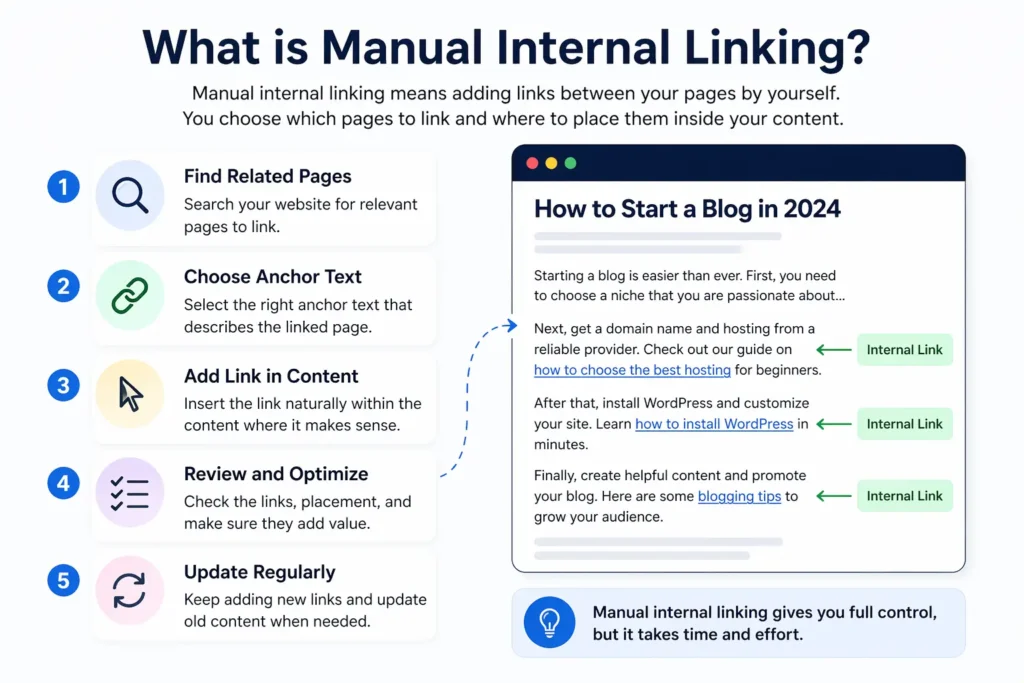
Manual internal linking means adding links between your pages by yourself. You choose which pages to link and where to place them inside your content.
When I started, I used this method for every post. I had to search for related articles and add links one by one.
It gives full control over anchor text and link placement. But it takes time and is easy to miss important linking opportunities.
What is Rank Math Link Genius?

Rank Math Link Genius is an AI-powered internal linking tool built into the Rank Math SEO plugin. It helps you find and create internal links automatically without doing everything manually.
Instead of searching for related posts one by one, Link Genius scans your website. It analyzes your content and suggests the best linking opportunities based on context.
It also helps you fix common issues like orphan pages and poor link distribution. This makes your site easier to crawl and improves your overall SEO structure.
With features like bulk update, keyword maps, and a centralized dashboard, Link Genius saves time and scales your internal linking. It’s designed to make linking faster, smarter, and more effective.
Rank Math Link Genius vs Manual Internal Linking (Quick Comparison Table)
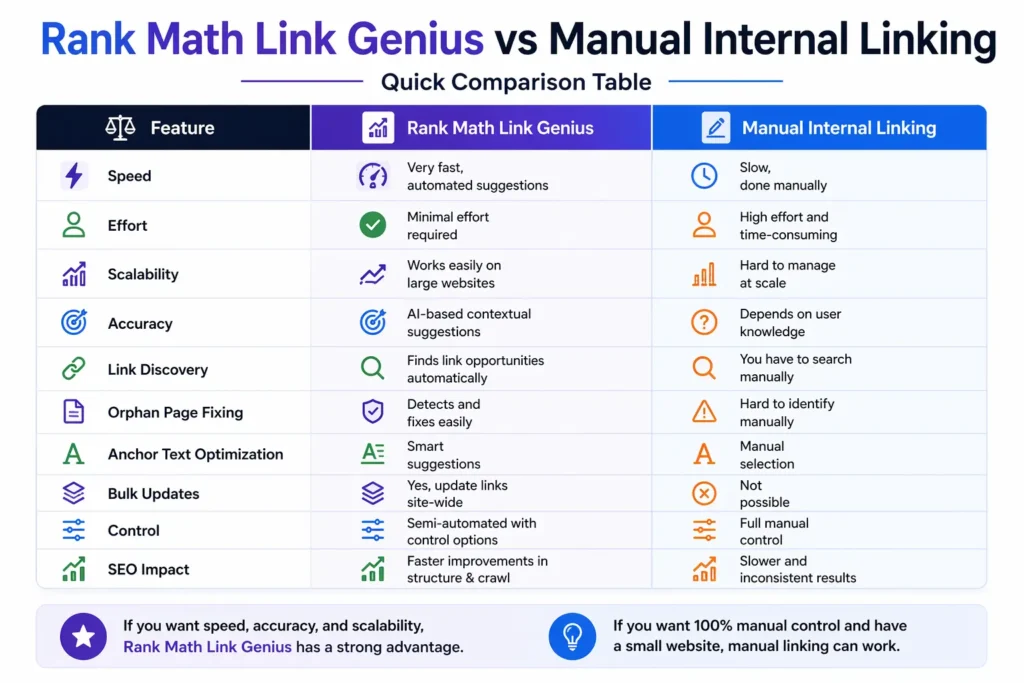
This comparison clearly shows the difference between automation and manual work.
If you want speed and scalability, Link Genius has a strong advantage.
How to Do Manual Internal Link Building
Manual internal linking starts with identifying the page you want to improve. You then look for other relevant posts on your website where you can naturally add a link to that page. The goal is to connect related content in a meaningful way.

Then you have to open the post where you want to do internal link building. Now you have to choose the right anchor text to create an internal link.
At first, you have to select the text, then click on the Link Icon.

Now you have two options, if you go with the first way, then you have to add the link to the 1st box, and then click on the 2nd button to embed the link.
But if you want to search for the related post, then you have to click on the 3rd button, as like the screenshot.

This popup allows you to manually add or edit an internal link inside your content. You can enter the destination URL and set the anchor text that will appear as the clickable link.
There is also an option to add a link title, which gives extra context when users hover over the link. You can control link behavior by choosing options like opening it in a new tab or adding nofollow and sponsored attributes.
If you don’t want to paste a URL manually, you can search your existing posts directly from the box. This makes it easier to link to your own content and build a proper internal linking structure.
How to Do AI Internal Link Building with Rank Math Link Genius
To go with Rank Math AI Link Genius for internal link building, there are a lot of ways available. Such as post link opportunities, related posts, bulk update, keyword maps, and much more.
Let’s explain all of those features one by one.
Link Genius Post Link Opportunities & Related Post
After getting the Rank Math Link Genius Features, you’ve got the new features of Link Opportunities and related posts.
Here is how it works.

After opening any of your pages or posts, you have to click on the Rank Math Icon to get the Rank Math features.

Then you have to scroll down and find the feature called Link opportunities and expand it.
Now you have to click on the generate button to find all of your Link opportunities for this post.

Then Rank Math will find all the link opportunities for this post.
Now you just need to click on it to add the link to your post.

The next feature is Related post. To enable Related posts, you have to enable it, then click on the Generate button to find related posts.

Then, within a second, a lot of related posts will appear.
Now you just have to click on the insert button to insert a related post into your article.
Bulk Update
The Bulk Update feature helps you edit multiple links across your site in one go. You can filter links by type, nofollow status, anchor type, post type, or even publish date.
Once filtered, you can update URLs, anchor texts, or attributes instantly. This saves hours of manual work, especially when migrating links or fixing site-wide issues.
Let me show you how you can use these features.

When you come to the first step, you don’t need to do anything. Just click on the next button to go to the next step.

In this step, you need to define exactly what changes you want to apply to your links. First, choose what to update—either anchor text, URLs, or both—based on your goal.
Then set the matching rules, like “Exact Match,” and enter the old text or URL in the “Find” field. After that, add your new replacement in the “Replace With” field, and adjust options like case sensitivity if needed before moving forward.

After coming to this last step, just click on the Preview Changes button to finish this Bulk Update process.
Remember: This process can take up to a few minutes.
Keyword Maps
The Keyword Maps feature lets you create reusable internal linking rules based on specific keywords. You can assign a target URL, and Rank Math will automatically link matching keywords across your content.
It also supports keyword variations and auto-linking, so you can scale internal linking without manual effort. This makes it easier to improve SEO structure and distribute link authority across your site.

To create a keyword map, you have to click on the Create Keyword Maps Button.

In this step, you need to create a new keyword map by defining the main keyword and its target URL. Start by adding a name for your map, then enter the URL where you want all matching keywords to link.
Next, configure rules like case sensitivity, auto-linking, and how many times the link can appear per post. After that, add keyword variations manually or generate them with AI, so Rank Math can automatically create internal links across your content.

After creating your keyword maps, just click on the Preview & Execute to see your keyword maps.

In this step, you are reviewing all the changes before applying them to your site. It shows how your anchor text and URLs will look after the update, so you can clearly compare the “before” and “after.”
You can select or deselect specific links, check how many posts are affected, and confirm everything looks correct. Once satisfied, simply click Apply Changes to update all selected links instantly.
Pros and Cons of Manual Internal Linking
Pros
- You decide where and how links are placed
- Links can be added naturally inside content
- You can adjust links based on content needs
- Works without any plugin or automation
- You can choose exact keywords for linking
Cons
- Takes a lot of effort, especially on large sites
- You may overlook important linking opportunities
- Hard to manage when your content grows
- Linking can become messy over time
- No central system to monitor all links
Pros and Cons of Rank Math Link Genius
Pros
- Finds relevant internal link opportunities automatically
- Reduces manual work and speeds up the linking process
- Easily identifies and connects isolated content
- Update links across multiple posts in one action
- Manage, track, and optimize all links from one place
Cons
- Requires proper configuration to get the best results
- You still need to review and approve suggestions
- Beginners may need time to understand all features
- Works best when your content is well-structured
- Full functionality require the paid version
Which One is Better for SEO?
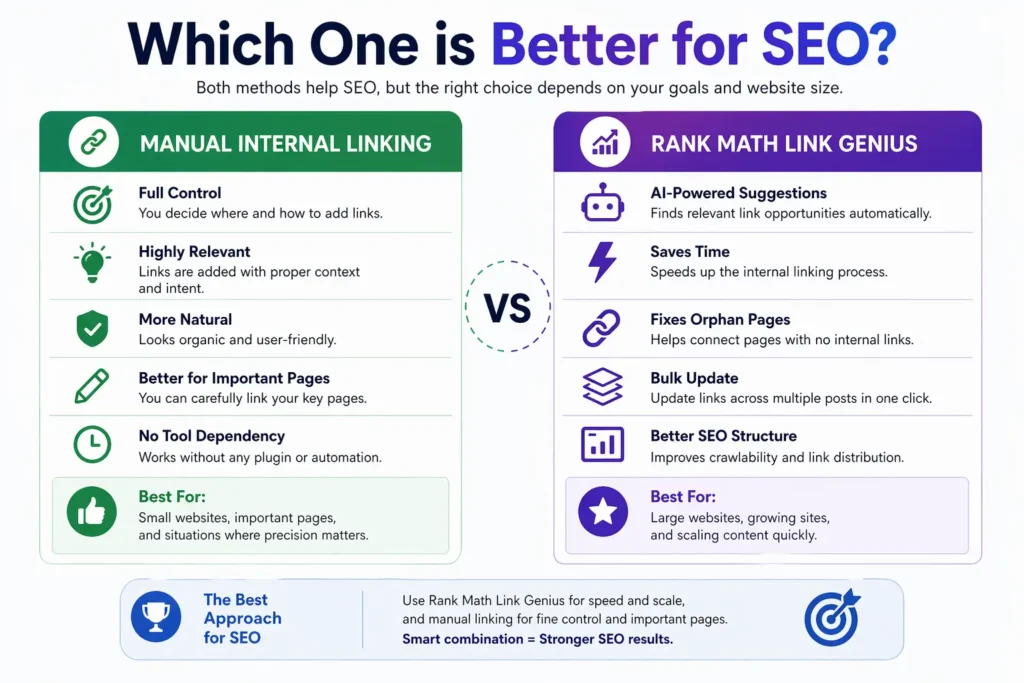
Manual internal linking gives you full control. You can place links exactly where they make sense and keep everything natural.
But it becomes difficult as your site grows. You may miss important links or create an unbalanced structure.
Rank Math Link Genius makes the process faster and more consistent. It helps you find link opportunities, fix orphan pages, and improve crawlability.
For SEO, a smart combination works best. Use Link Genius for speed and scale, and manual linking for fine control where needed.
Conclusion
Internal linking plays a major role in how your website performs in search. A strong structure helps search engines crawl your pages and improves overall rankings.
Manual linking works well for small sites and gives full control. But as your content grows, it becomes slow, hard to manage, and easy to miss important links.
Rank Math AI Link Genius solves this problem by making internal linking faster and smarter. It helps you find link opportunities, fix orphan pages, and manage everything from one place.
From my experience, using Rank Math Link Genius is the best way to scale your internal linking. If you want better SEO with less effort, I highly recommend using it.
FAQ of Rank Math Link Genius vs Manual Internal Linking
It’s an AI-powered tool that automatically finds and builds internal links on your website.
Yes, it works for small sites but becomes difficult as your content grows.
No, it works best when combined with manual control for key pages.
It improves crawlability, fixes orphan pages, and distributes link value better.
Yes, it’s easy to use after basic setup and understanding.
Yes, it’s designed to scale and manage links across many pages.
Yes, it’s available only in Rank Math Pro.
Yes, as long as you review and keep links natural and relevant.