
Internal linking was something I ignored when I started blogging. I focused more on content and keywords, thinking that was enough to rank.
But over time, I realized my pages were not connected properly. Some posts were getting traffic, while others stayed hidden with no links at all.
This weak structure was holding my site back. Search engines couldn’t understand which pages were important, and I was losing ranking opportunities.
That’s when I started using Rank Math to build a proper internal linking strategy. It helped me connect my content better and improve my overall SEO performance.
What is Internal Linking in SEO?

Internal linking means connecting one page of your website to another page on the same site. These links help users navigate your content and find related information easily.
From my experience, internal links also help search engines crawl your website more efficiently. They act like paths that guide crawlers from one page to another.
When I started blogging, some of my pages were not getting crawled properly. Those pages had no internal links, so search engines couldn’t find them easily.
After improving internal linking, my pages started getting crawled and indexed faster. This helped improve visibility and overall SEO performance.
Common Internal Linking Mistakes to Avoid
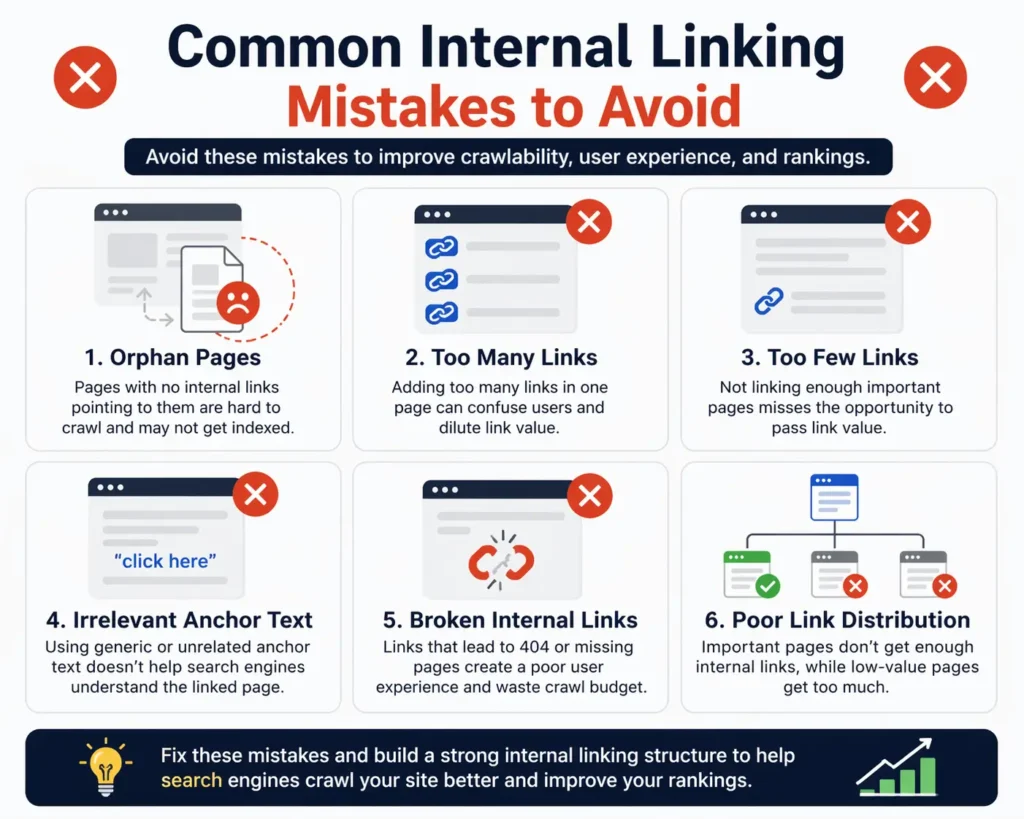
When I started internal linking, I made a lot of small mistakes. These issues slowly affected my rankings and site structure.
Here are the most common mistakes I faced:
- Orphan Pages: Posts with no internal links pointing to them
- Too Many Links: Adding too many links in one post
- Too Few Links: Not linking enough important pages
- Irrelevant Anchor Text: Using random or unclear anchor text
- Broken Internal Links: Links leading to 404 pages
- Poor Link Distribution: Important pages not getting enough links
After fixing these, my site became easier to crawl and perform better in search results.
Benefits of a Strong Internal Linking Strategy
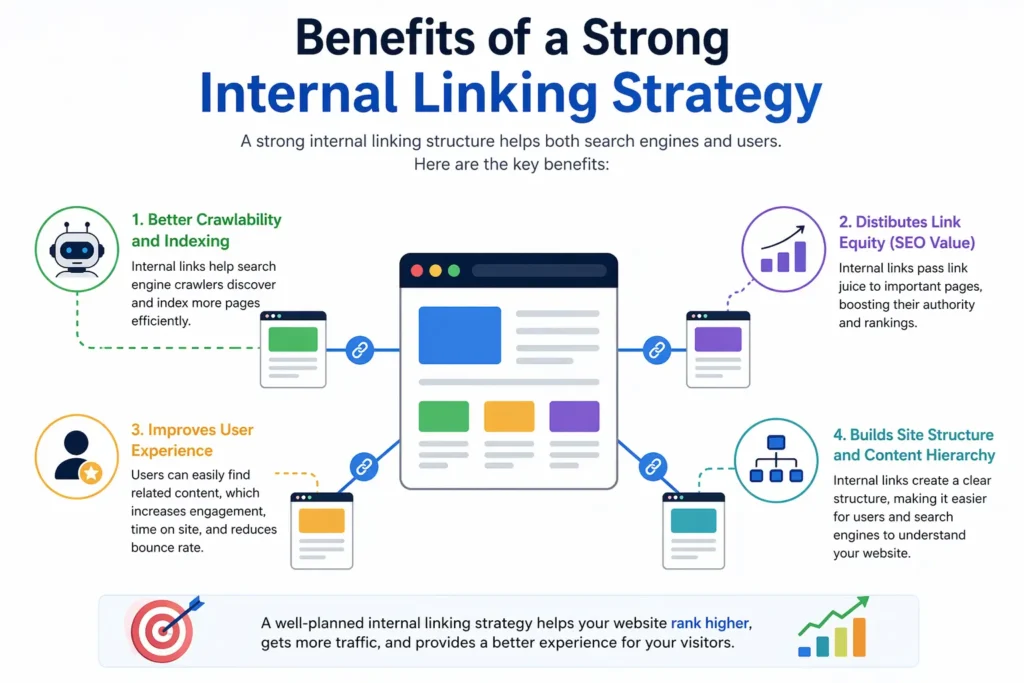
A strong internal linking strategy helps search engines crawl your website more efficiently. When pages are properly connected, crawlers can easily discover and index your content faster.
It also helps distribute link equity (SEO value) across your site. This means your important pages get more authority and have a better chance to rank higher.
Internal linking improves user experience and engagement. Visitors can easily find related content, which increases time on site and reduces bounce rate.
Finally, it helps build a clear site structure and content hierarchy. This makes it easier for both users and search engines to understand your website.
How to Build Internal Linking Strategy with Rank Math
Rank Math AI Link Genius comes with five main features: Overview, Posts, Links, Bulk Update, and Keyword Maps. Each feature helps you manage and improve your internal linking in a simple way.
In the next section, I’ll explain each feature one by one so you can understand how to use them properly.
Quick Overview

The Overview section gives a quick summary of your internal link health. I can see how many links are working, broken, redirected, or blocked in one place.
It also shows unchecked links and marked safe links, which helps me understand what still needs attention. This makes it easy to track issues without digging into each page.
The status distribution chart gives a clear visual breakdown of link types. I can quickly see how many links are successful, blocked, or unchecked.
There’s also a link health section that highlights problems like broken links. This helps me fix issues faster and keep my internal linking clean.
Post Tutorial

Once you go to the Post tab, then 3 additional tabs will open: All posts, Orphan Posts, and With incoming links.
On this page, I can see all my posts and pages with their internal linking data. It shows internal links, external links, incoming links, and SEO score for each post.
This helps me quickly find pages with no internal links or poor SEO score. Instead of checking manually, everything is listed in one place.
I usually use this to improve weak posts by adding internal links. This made my content more connected and improved my SEO over time.

On this page, I can see all orphan posts that don’t have any internal links pointing to them. These are pages that search engines and users may not easily find.
I use this to quickly identify which posts need internal links. It helps me connect those pages with other content on my site.
I can also add external links to these pages to improve their visibility. This makes the content more useful and improves overall SEO.

This section shows posts that already have incoming internal links from other pages. It helps me see which content is well connected inside my site.
I use this to understand which pages are getting more link value and attention. It also helps me improve other posts that are still weak.
This way, I can balance my internal linking and make sure important pages perform better in search results.
Links Tutorial

The Links tab shows all internal and external links across my website in one place. I can see the source page, destination URL, anchor text, and link type clearly.
It also lets me filter links by status like success, broken, redirects, or blocked. This makes it easy to find issues without checking each post manually.
I can edit, recheck, or remove any link directly from this page. This helps me manage links faster and keep my site clean and optimized.
To edit any of the links, just you’ve to hover on it, then a lot of options appear. Now you have to click on edit.

The Edit Link feature lets me quickly update any link without opening the post. I can change the URL and anchor text directly from the dashboard.
I can also add nofollow or open the link in a new tab with one click. This saves time and makes link management much easier.
Bulk Update Tutorial
The Bulk Update feature helps you edit multiple links across your site in one go. You can filter links by type, nofollow status, anchor type, post type, or even publish date.
Once filtered, you can update URLs, anchor texts, or attributes instantly. This saves hours of manual work, especially when migrating links or fixing site-wide issues.
Let me show you how you can use these features.

When you come to the first step, you don’t need to do anything. Just click on the next button to go to the next step.

In this step, you need to define exactly what changes you want to apply to your links. First, choose what to update—either anchor text, URLs, or both—based on your goal.
Then set the matching rules, like “Exact Match,” and enter the old text or URL in the “Find” field. After that, add your new replacement in the “Replace With” field, and adjust options like case sensitivity if needed before moving forward.

After coming to this last step, just click on the Preview Changes button to finish this Bulk Update process.
Remember: This process can take up to a few minutes.
Keyword Maps Tutorial
The Keyword Maps feature lets you create reusable internal linking rules based on specific keywords. You can assign a target URL, and Rank Math will automatically link matching keywords across your content.
It also supports keyword variations and auto-linking, so you can scale internal linking without manual effort. This makes it easier to improve SEO structure and distribute link authority across your site.

To create a keyword map, you have to click on the Create Keyword Maps Button.

In this step, you need to create a new keyword map by defining the main keyword and its target URL. Start by adding a name for your map, then enter the URL where you want all matching keywords to link.
Next, configure rules like case sensitivity, auto-linking, and how many times the link can appear per post. After that, add keyword variations manually or generate them with AI, so Rank Math can automatically create internal links across your content.

After creating your keyword maps, just click on the Preview & Execute to see your keyword maps.

In this step, you are reviewing all the changes before applying them to your site. It shows how your anchor text and URLs will look after the update, so you can clearly compare the “before” and “after.”
You can select or deselect specific links, check how many posts are affected, and confirm everything looks correct. Once satisfied, simply click Apply Changes to update all selected links instantly.
How Link Genius Finds Link Opportunities & Related Posts
After getting the Rank Math Link Genius Features, you’ve got the new features of Link Opportunities and related posts.
Here is how it works.

After opening any of your pages or posts, you have to click on the Rank Math Icon to get the Rank Math features.

Then you have to scroll down and find the feature called Link opportunities and expand it.
Now you have to click on the generate button to find all of your Link opportunities for this post.

Then Rank Math will find all the link opportunities for this post.
Now you just need to click on it to add the link to your post.

The next feature is Related post. To enable Related posts, you have to enable it, then click on the Generate button to find related posts.

Then, within a second, a lot of related posts will appear.
Now you just have to click on the insert button to insert a related post into your article.
Internal Linking Strategy for Beginners vs Advanced Users
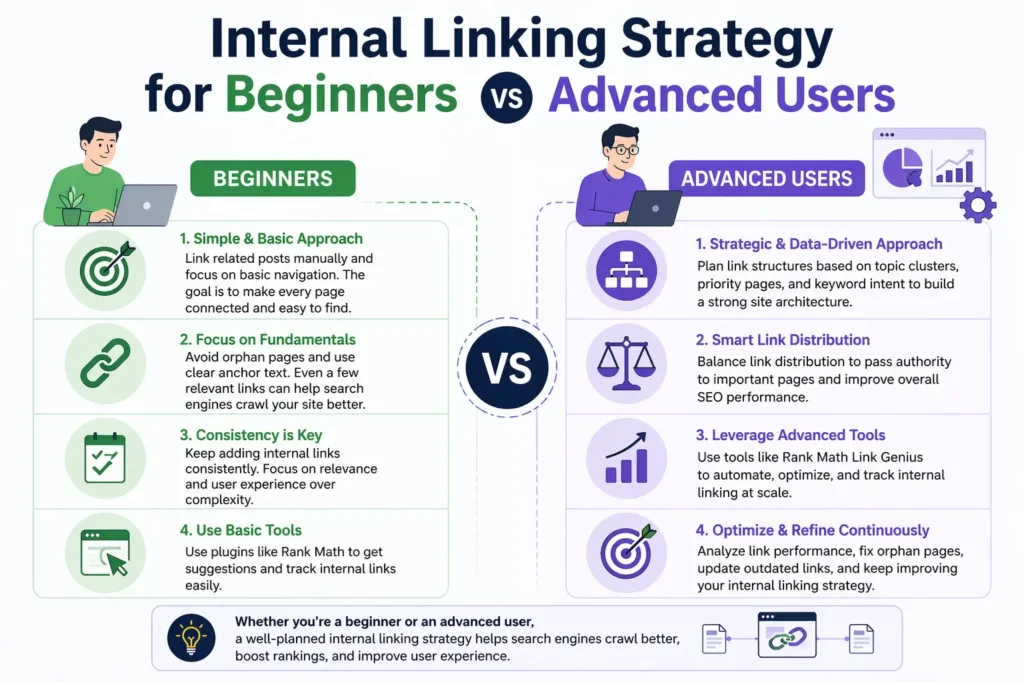
Beginners usually start with simple internal linking. They link related posts manually and focus on basic navigation. The goal is to make sure every page is connected and easy to find.
At this stage, it’s important to avoid orphan pages and use clear anchor text. Even a few relevant links can help search engines crawl your site better. Consistency matters more than complexity.
Advanced users take a more strategic approach. They plan link structures based on topic clusters, priority pages, and keyword intent. They also balance link distribution to pass authority to important pages.
With tools like Rank Math Link Genius, advanced users can automate and optimize linking at scale. This helps maintain a strong structure while saving time and improving SEO performance.
Final Talk
A strong internal linking strategy builds the foundation of your SEO. It helps search engines crawl your site and understand which pages matter the most. Without proper links, even good content can stay hidden.
As your website grows, managing links manually becomes difficult. You may miss orphan pages or create weak structures that hurt performance. This is where a smart system becomes important.
Rank Math AI Link Genius makes this process much easier. It helps you find link opportunities, fix issues, and manage everything in one place, which is why I recommend using it.
FAQs
It’s a plan to connect your pages using internal links. This helps search engines understand your site structure.
It helps search engines find and index your pages. It also passes link value to important content.
There is no fixed number. I usually add links where they feel natural and useful.
Orphan pages are posts with no internal links pointing to them. These pages are hard to find and rank.
Rank Math shows link suggestions and tracks link data. It also helps fix orphan pages and link issues.
Use clear and relevant anchor text. It should describe the page you are linking to.
Yes, it helps distribute link value and improves site structure. This can boost rankings over time.
Yes, if used properly. Tools like Rank Math help keep links relevant and controlled.
Blogging
Blogging is an excellent platform for promoting affiliate products. You can write reviews, and listicles, or even include Temu products in gift guides on your blog. Make sure to include your affiliate links within the content and optimize them with relevant keywords for SEO purposes.
Promoting Temu’s influencer program, dropshipping options, and Free Spin feature on your blog can also attract potential customers and increase your affiliate sales.
Blogging
Blogging is an excellent platform for promoting affiliate products. You can write reviews, and listicles, or even include Temu products in gift guides on your blog. Make sure to include your affiliate links within the content and optimize them with relevant keywords for SEO purposes.
Promoting Temu’s influencer program, dropshipping options, and Free Spin feature on your blog can also attract potential customers and increase your affiliate sales.
Blogging
Blogging is an excellent platform for promoting affiliate products. You can write reviews, and listicles, or even include Temu products in gift guides on your blog. Make sure to include your affiliate links within the content and optimize them with relevant keywords for SEO purposes.
Promoting Temu’s influencer program, dropshipping options, and Free Spin feature on your blog can also attract potential customers and increase your affiliate sales.
Blogging
Blogging is an excellent platform for promoting affiliate products. You can write reviews, and listicles, or even include Temu products in gift guides on your blog. Make sure to include your affiliate links within the content and optimize them with relevant keywords for SEO purposes.
Promoting Temu’s influencer program, dropshipping options, and Free Spin feature on your blog can also attract potential customers and increase your affiliate sales.
Blogging
Blogging is an excellent platform for promoting affiliate products. You can write reviews, and listicles, or even include Temu products in gift guides on your blog. Make sure to include your affiliate links within the content and optimize them with relevant keywords for SEO purposes.
Promoting Temu’s influencer program, dropshipping options, and Free Spin feature on your blog can also attract potential customers and increase your affiliate sales.
Blogging
Blogging is an excellent platform for promoting affiliate products. You can write reviews, and listicles, or even include Temu products in gift guides on your blog. Make sure to include your affiliate links within the content and optimize them with relevant keywords for SEO purposes.
Promoting Temu’s influencer program, dropshipping options, and Free Spin feature on your blog can also attract potential customers and increase your affiliate sales.
Blogging
Blogging is an excellent platform for promoting affiliate products. You can write reviews, and listicles, or even include Temu products in gift guides on your blog. Make sure to include your affiliate links within the content and optimize them with relevant keywords for SEO purposes.
Promoting Temu’s influencer program, dropshipping options, and Free Spin feature on your blog can also attract potential customers and increase your affiliate sales.
Blogging
Blogging is an excellent platform for promoting affiliate products. You can write reviews, and listicles, or even include Temu products in gift guides on your blog. Make sure to include your affiliate links within the content and optimize them with relevant keywords for SEO purposes.
Promoting Temu’s influencer program, dropshipping options, and Free Spin feature on your blog can also attract potential customers and increase your affiliate sales.
Blogging
Blogging is an excellent platform for promoting affiliate products. You can write reviews, and listicles, or even include Temu products in gift guides on your blog. Make sure to include your affiliate links within the content and optimize them with relevant keywords for SEO purposes.
Promoting Temu’s influencer program, dropshipping options, and Free Spin feature on your blog can also attract potential customers and increase your affiliate sales.